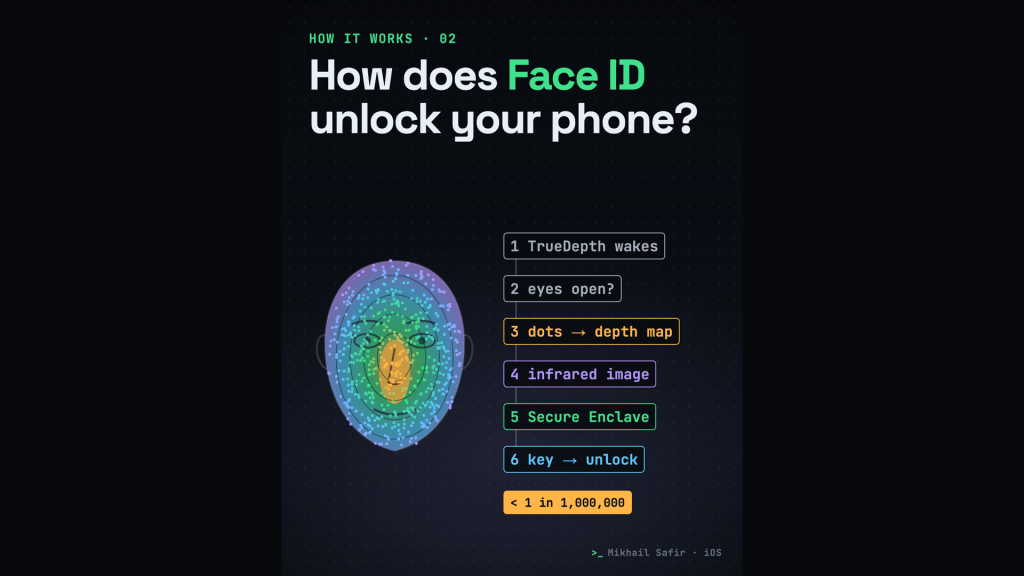
You look at your iPhone and it unlocks. No button, no code. It feels instant, but a surprising amount happens in that glance. This is episode two of How it works, a series where I take one familiar thing and follow it step by step.
1. The TrueDepth camera wakes up
Face ID doesn’t watch you all the time. The TrueDepth camera turns on when you tap or raise the phone to wake it, or when a notification lights up the screen. It is made of a dot projector, an infrared camera and a flood illuminator, and it works in infrared, so Face ID works even in total darkness.
2. Attention comes first
When it finds a face, Face ID first checks attention: your eyes have to be open. A face with closed eyes doesn’t unlock the phone.
3. Thousands of dots become a depth map
The dot projector throws thousands of invisible infrared dots onto your face. When Apple announced the iPhone X in 2017, it gave the number as more than 30,000. The infrared camera reads where the dots land and builds a depth map, a 3D shape of your face.
4. A flat infrared photo, in a random order
It also takes a regular 2D infrared image. To make spoofing harder, the camera shuffles the order of 2D images and depth captures, and the dot pattern is a random pattern specific to your device.
5. Into the Secure Enclave
The images and depth maps are digitally signed and sent to the Secure Enclave, a separate, isolated part of the chip. There, a protected part of the Secure Neural Engine turns them into a mathematical representation and compares it with the face you enrolled. Your face never becomes something an app can read.
6. A match releases a key
This is the part I like most. Face ID doesn’t just say “yes”. When Face ID is on, the keys that protect your data are kept wrapped with a key that only the Face ID subsystem in the Secure Enclave holds. A match releases that key, the data protection keys are unwrapped, and the phone unlocks.
Apple puts the chance that a random person’s face unlocks your phone at less than 1 in 1,000,000 with one enrolled appearance. It is higher for twins and siblings who look like you, and for children under 13. Face ID data doesn’t leave the device and is never backed up to iCloud.
7. The passcode is still the master key
After a restart, the keys Face ID needs are gone, so the phone asks for your passcode. The same happens after five failed matches, or if you haven’t unlocked it for more than 48 hours. Face ID is a fast way in; the passcode is the foundation.
What this means for iOS developers
- Your app never sees a face. With
LocalAuthentication(evaluatePolicy) you only get success or an error back from the system. - For real protection, tie secrets to biometrics in the Keychain with access control (for example
.biometryCurrentSet), so the Secure Enclave releases them only after a match. - Always plan a passcode fallback: Face ID can be unavailable after a restart or after failed attempts.
- Add
NSFaceIDUsageDescriptionto Info.plist: the message that tells people why your app wants to use Face ID.
Sources: Apple Support “About Face ID advanced technology”; Apple Platform Security guide (“Facial matching security”, “Uses for Optic ID, Face ID, Touch ID”); Apple Newsroom “The future is here: iPhone X” (2017); Apple Developer documentation for LocalAuthentication and Keychain access control.
I’m Mikhail Safir, a Senior iOS engineer in Barcelona. I make these explainers in code (Remotion and an AI voice). What should I explain next? Tell me on LinkedIn or subscribe on YouTube.

