Optimizing Efficiency and User Experience in Mobile Development through Advanced Configurations and Shortcut Implementations
As an iOS developer at Walmart Global Tech, I look forward to sharing the advanced strategies I’ve honed to enhance productivity. My involvement in a large-scale project with a substantial codebase and strict coding regulations demanded an efficient workflow, propelling me to fine-tune my expertise. This experience underscored the importance of continual skill refinement in tackling complex, large-scale development tasks.
The Challenge: Simplifying Complex Workflows
Working in a large project comes with its fair share of intricacies: numerous dependencies, repetitive tasks, and a lack of optimization. I needed a solution that could simplify my workflow and boost my efficiency. Use this link to install some casks in brew for more effective work.
The Solution: Embracing Xcode Shortcuts and Vim
To address this, I turned to Xcode shortcuts and Vim. These tools allowed me to perform a multitude of code changes and terminal actions with fewer movements, significantly increasing my speed. I leveraged keyboard shortcuts to their full extent, minimizing the use of my mouse and maximizing productivity. You can find my xcode configs here: link
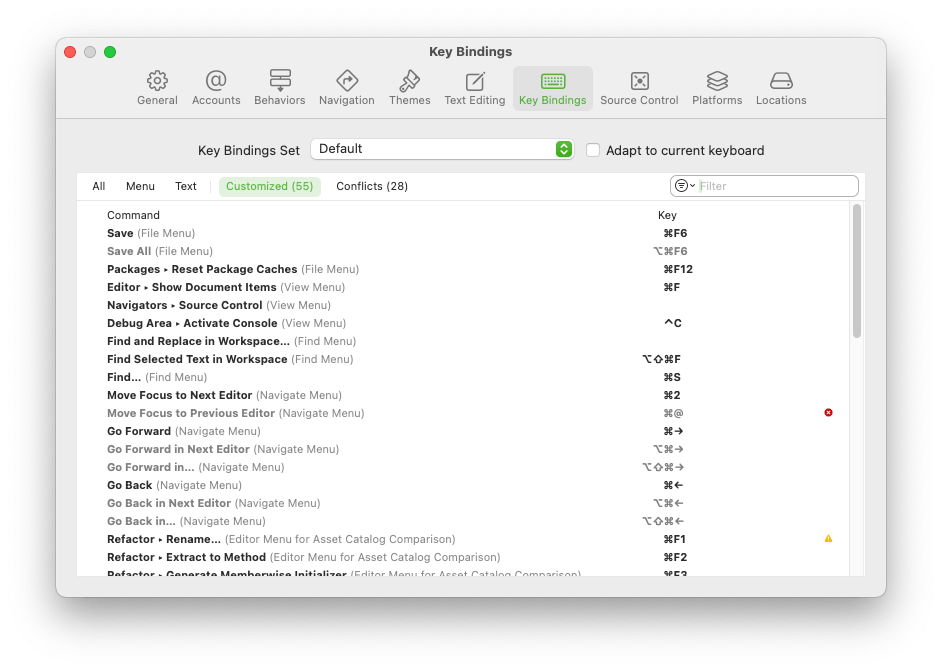
The Results: Increased Efficiency and Comfort
My switch to keyboard-centric operations and terminal usage made a noticeable difference. I created helper scripts to perform most mouse-necessary actions on my Mac, such as Wi-Fi toggling, Git operations, calendar and notifications management. This strategy helped me focus on the more crucial aspects of my work, reducing fatigue and increasing efficiency.
The Vim Experience: A Game-Changer
My transition to Vim was transformative. Despite not having used this subeditor before, once I realized that Xcode natively supports Vim mode, my work process improved significantly. It was fascinating to unlock a world of new features without installing a single thing on my Mac.
The Power of Touch Typing: A Personal Transformation
Another pivotal aspect of my journey has been my dedication to mastering touch typing. A few months ago, I embarked on this initiative and have since seen my ability to type accelerate to an impressive 80-90 words per minute. This newfound speed has not only enhanced my comfort while working but has also significantly expedited my workflow.
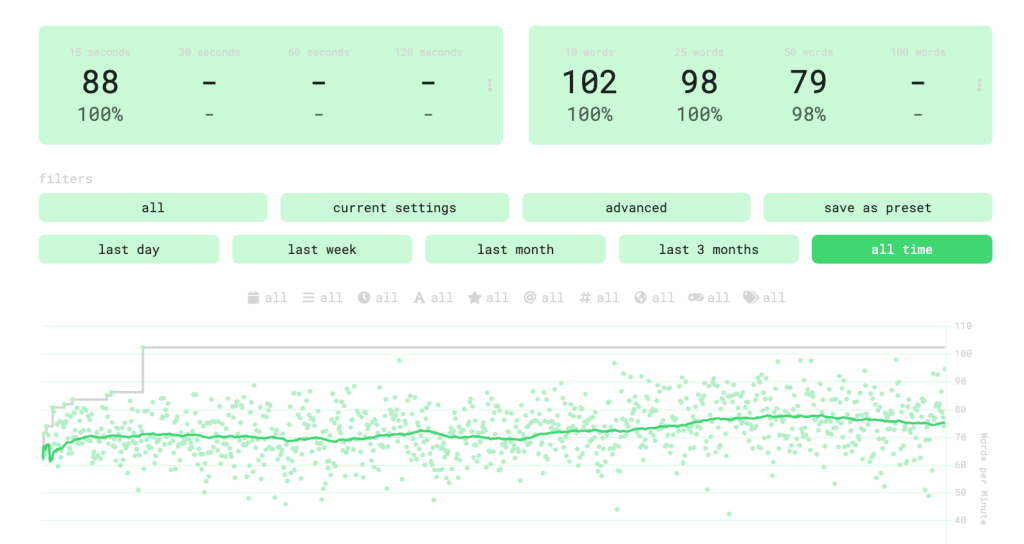
I used this website to track my progress and begin typing faster.
https://monkeytype.com/profile/tinyprocessing
My decision to venture into touch typing arose from a realization that positioning my fingers centrally on the keyboard minimized the distance to all keys, optimizing my typing efficiency. This adjustment allowed me to type faster and more accurately, without the need to continuously glance at the keyboard.
In the context of Vim, this skill has been particularly beneficial. I’ve adopted ‘hjkl’ as my navigation keys in Vim mode in Xcode, which has further streamlined my coding process. The combination of touch typing and Vim has truly revolutionized the way I work, making me more effective and efficient.
As I reflect on these experiences, I am reminded of the profound impact that continuous learning and skill development can have on our work. My journey with touch typing and Vim is a testament to this, and I hope it serves as an inspiration to fellow developers to continually seek out innovative techniques that can enhance their productivity. As I continue to evolve in my career, I am excited to share more insights and learnings from my journey.
Throughout this journey, I’ve learned that embracing innovative tools and methods can have a profound impact on work efficiency. My hope is that my experiences can inspire other developers to explore new avenues to enhance their productivity. I look forward to sharing more insights from my journey in future posts.
 Mikhail Safir